In the previous article, we saw a first example of using JSP, where Java was embedded into the HTML to perform the dynamic part.
In this article, we are going to enhance the structure of the previous example, by making use of a Java Bean.
This structure enhances readability, and separates the code of the user interface from the code to perform computations.
In the case of more complex applications, the structure of the first example would lead to a solution difficult to understand and maintain. The structure of the solution presented in this article is more flexible, readable and so more easy to maintain and evolve.
So, we shall create a Net Beans project, just like in the first example, and make the same modifications to index.jsp. Then, we create the new JSP file (newjsp.jsp):
Contrary to what we saw in the First JSP Example, this file has not embedded the code to obtain the parameters or the calculation of the operation result. It has, instead, a JavaBean component that is no more than a class who are passed the parameters and performs the required calculations.
Showing posts with label Java. Show all posts
Monday, December 9, 2013
JSP - Enhance the first JSP example with Java Beans
First JSP example
Java Server Pages (JSP) is a Java technology that allows creating web pages with a mix of static HTML and dynamic HTML. The dynamic part is generated by using Java language scripts that are embbeded in the HTML code through special Tags, recognized by the application server.
In this article we will see a small example that will serve to introduce some of the JSP tags and help in understanding how does Java work in the middle of all the rest.
The example is made with NetBeans IDE 7.2.1, and it consists of a small calculator that will allow to perform the four arithmetic operations on two integer operands.
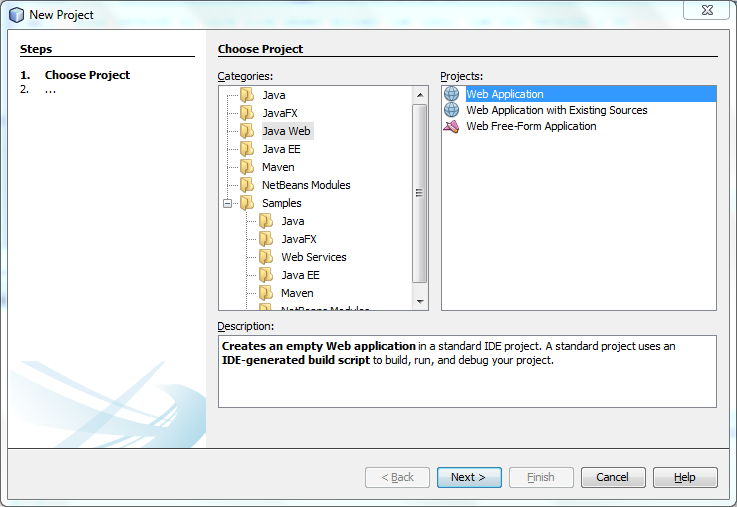
Let's start by creating a new project in NetBeans, of type Web Application:
As applicational server we will use GlassFish:
(we don't select any framework, in step 4 of creating a new project)
NetBeans creates a project structure with a file index.jsp, which will generate the initial page of the project:
Initial contents of file index.jsp:
In this article we will see a small example that will serve to introduce some of the JSP tags and help in understanding how does Java work in the middle of all the rest.
The example is made with NetBeans IDE 7.2.1, and it consists of a small calculator that will allow to perform the four arithmetic operations on two integer operands.
Let's start by creating a new project in NetBeans, of type Web Application:
As applicational server we will use GlassFish:
(we don't select any framework, in step 4 of creating a new project)
NetBeans creates a project structure with a file index.jsp, which will generate the initial page of the project:
Initial contents of file index.jsp:
Tuesday, April 17, 2012
Using Hibernate for Java - 2
In the previous article we saw how to use Hibernate as a middleware layer between the class structure of our Java program and the representation of instances of these classes in a database.
The previous article illustrated the mapping between a Java class and a database table, namelly the class Book and the table with the same name.
Let us now see how to map the class relationships, of type 1-to-N and N-to-N, to the database.
Let's start by adding to our model, which only had one class, two new classes:
- BookCopy (A Book contains the information of a book, and is related to several BookCopy, which correspond to the book copies a library has of that book) --> 1-N relationship.
- Author (A Book has several Author and vice-versa) --> relação N-N relationship.
In the Java project, developed in the previous post, let's start by adding class BookCopy and the respective Hibernate mapping file BookCopy.hbm.xml.
The previous article illustrated the mapping between a Java class and a database table, namelly the class Book and the table with the same name.
Let us now see how to map the class relationships, of type 1-to-N and N-to-N, to the database.
Let's start by adding to our model, which only had one class, two new classes:
- BookCopy (A Book contains the information of a book, and is related to several BookCopy, which correspond to the book copies a library has of that book) --> 1-N relationship.
- Author (A Book has several Author and vice-versa) --> relação N-N relationship.
In the Java project, developed in the previous post, let's start by adding class BookCopy and the respective Hibernate mapping file BookCopy.hbm.xml.
Sunday, April 15, 2012
Using Hibernate for Java - 1
Hibernate is a framework for object-relational mapping with Java language. It facilitates mapping classes, attributes and class relationships between an application class model and its implementation in a relational database. For defining the mappings, XML files or Java anotations can be used.
Hibernate works as a middleware layer between the Java objects and the relational database.
In this article, and in the next one, we will use Hibernate version 3 to ilustrate, through a small example, the utilization of Hibernate in a Java program.
As database system we will be using Oracle 10g.
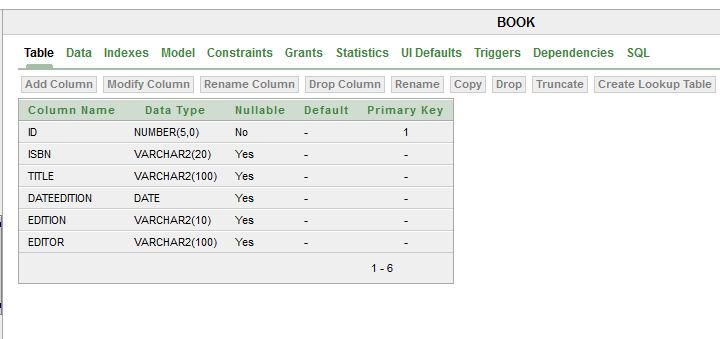
To start with, we need to crate the database tables. In the article Example of Java Swing Application with Oracle Database - 1 this process is explained.
In this article, we will only be mapping class BOOK.
We create a package for the classes corresponding to database tables, and create class Book:
Saturday, March 3, 2012
Example of Java Swing desktop application without the JSR - 2
In this article we are going to create a Java Swing-based GUI project to complement the ones we previously made, and whose developments are addressed in:
- Example of Java Swing Application with Oracle Database – 1
- Example of Java Swing Application with Oracle Database – 2
- Example of Java Swing Application with Oracle Database – 3
- Example of Java Swing desktop application without the JSR - 1
In NetBeans 7.1, we need to create a Java Application Project:
A Java Application Project automatically creates a class with method main().
We really don't need that class, because we are going to create a JFrame, which automatically creates a main() method that launches it and makes the frame visible.
Anyway, and before creating the JFrame, let's add the needed references to our new project. We need to add, in the project libraries, references to projects HelperDB and librarySystemBLL. References to "ojdbc" jars that come with Oracle XE also need to be added, just like we did before in the other two projects.
Now, let's create the JFrame, that will be the application's main window:
- Example of Java Swing Application with Oracle Database – 1
- Example of Java Swing Application with Oracle Database – 2
- Example of Java Swing Application with Oracle Database – 3
- Example of Java Swing desktop application without the JSR - 1
In NetBeans 7.1, we need to create a Java Application Project:
A Java Application Project automatically creates a class with method main().
We really don't need that class, because we are going to create a JFrame, which automatically creates a main() method that launches it and makes the frame visible.
Anyway, and before creating the JFrame, let's add the needed references to our new project. We need to add, in the project libraries, references to projects HelperDB and librarySystemBLL. References to "ojdbc" jars that come with Oracle XE also need to be added, just like we did before in the other two projects.
Now, let's create the JFrame, that will be the application's main window:
Friday, February 24, 2012
Example of Java Swing desktop application without the JSR - 1
From NetBeans 7.1, Swing application framework (JSR) left being supported by NetBeans, and is no longer part of the official JDK (Java Development Kit).
So, in this article, and the next one, we'll make a small application with Swing classes without using the Swing application framework.
We will make use of the application layers previously developed in:
- Example of Java Swing Application with Oracle Database – 1 (database creation)
- Example of Java Swing Application with Oracle Database – 2 (HelperDB project for accessing the database)
- Example of Java Swing Application with Oracle Database – 3 (librarySystemBLL project / BLL classes)
So, after creating the database, and having present projects HelperDB and librarySystemBLL, we will create a new project (librarySystemGUI) for the user interface.
Firstly, we will see how to import a project to NetBeans, having only the java sources developed in any IDE.
Thursday, February 23, 2012
Swing-based desktop applications after NetBeans 7.1
In the articles
- Example of Java Swing Application with Oracle Database – 1
- Example of Java Swing Application with Oracle Database – 2
- Example of Java Swing Application with Oracle Database – 3
- Example of Java Swing Application with Oracle Database – 4
we developed a small example application, for desktop, using Java/JavaSwing.
For that we used NetBeans IDE, and created a project of type Java Desktop Application for the user interface.
Since NetBeans 7.1, however, Swing application framework is no longer supported by NetBeans, and stopped being part of the official JDK (Java Development Kit). In fact, in NetBeans 7.0.1, the following message already appeared every time one created a Java Desktop Application project:
In NetBeans 7.1 we have, at least, two alternatives:
- Example of Java Swing Application with Oracle Database – 1
- Example of Java Swing Application with Oracle Database – 2
- Example of Java Swing Application with Oracle Database – 3
- Example of Java Swing Application with Oracle Database – 4
we developed a small example application, for desktop, using Java/JavaSwing.
For that we used NetBeans IDE, and created a project of type Java Desktop Application for the user interface.
Since NetBeans 7.1, however, Swing application framework is no longer supported by NetBeans, and stopped being part of the official JDK (Java Development Kit). In fact, in NetBeans 7.0.1, the following message already appeared every time one created a Java Desktop Application project:
In NetBeans 7.1 we have, at least, two alternatives:
- To create an application from scratch, or
- To create a project of type Netbeans Platform Application
Friday, February 17, 2012
First Eclipse Modeling Framework (EMF) example - 3
In the previous article we've created a domain model for a Library Management System, and we've generated a set of corresponding Java classes, by using Eclipse Modeling Framework (EMF).
Now, we're going to test those classes through a new Eclipse project, which references the one with the generated classes.
So, we now create a new plug-in project:
File --> Create --> New --> Project... --> Plug-in Project.
And, in folder src, we create a new class with a stub for method main:

And we create, in method main(), a few lines of code:
This is only the beginning. Now you should create instances of the remaining classes, inter-relate them, and query its attribute values and the values of the relation attributes.
Related articles:
- First Eclipse Modeling Framework (EMF) example - 1
- First Eclipse Modeling Framework (EMF) example - 2
Now, we're going to test those classes through a new Eclipse project, which references the one with the generated classes.
So, we now create a new plug-in project:
File --> Create --> New --> Project... --> Plug-in Project.
And, in folder src, we create a new class with a stub for method main:
And we create, in method main(), a few lines of code:
package javaUsingEMFModel.LibrarySystem;
import org.eclipse.emf.ecore.*;
import LibraryModel.*;
import LibraryModel.impl.*;
import LibraryModel.util.*;
public class MainClass {
public static void main(String[] args) {
import org.eclipse.emf.ecore.*;
import LibraryModel.*;
import LibraryModel.impl.*;
import LibraryModel.util.*;
public class MainClass {
public static void main(String[] args) {
// Inicialize the LibraryModelPackageImpl
LibraryModelPackageImpl.init();
LibraryModelFactory factory = LibraryModelFactory.eINSTANCE;
// Create a new Book
Book book = factory.createBook();
// Create a new Book
Book book = factory.createBook();
// Give a title to the book
book.setTitle("Os Lusiadas");
// Create an Author, and define his/her name and surname
Author author1 = factory.createAuthor();
author1.setName("Luis");
author1.setSurname("Camoes");
// Add that author as an author of the previously created book
book.getAuthors().add(author1);
System.out.println(book.getTitle());
}
}
book.setTitle("Os Lusiadas");
// Create an Author, and define his/her name and surname
Author author1 = factory.createAuthor();
author1.setName("Luis");
author1.setSurname("Camoes");
// Add that author as an author of the previously created book
book.getAuthors().add(author1);
System.out.println(book.getTitle());
}
}
Related articles:
- First Eclipse Modeling Framework (EMF) example - 1
- First Eclipse Modeling Framework (EMF) example - 2
Subscribe to:
Posts (Atom)