Showing posts with label ORM Tools. Show all posts

Tuesday, April 17, 2012

Using Hibernate for Java - 2

In the previous article we saw how to use Hibernate as a middleware layer between the class structure of our Java program and the representation of instances of these classes in a database.


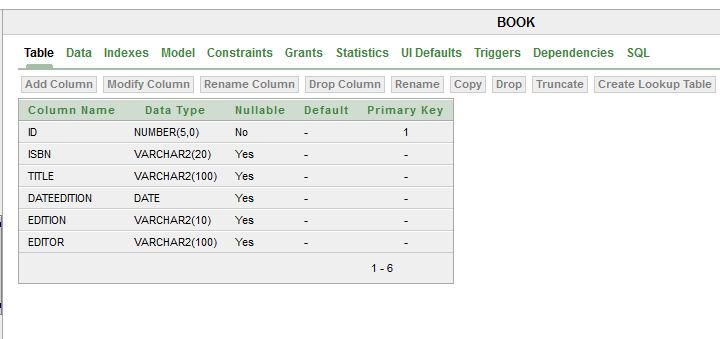
The previous article illustrated the mapping between a Java class and a database table, namelly the class Book and the table with the same name.

Let us now see how to map the class relationships, of type 1-to-N and N-to-N, to the database.

Let's start by adding to our model, which only had one class, two new classes:
     - BookCopy (A Book contains the information of a book, and is related to several BookCopy, which correspond to the book copies a library has of that book) --> 1-N relationship.
     - Author (A Book has several Author and vice-versa) --> relação N-N relationship.


In the Java project, developed in the previous post, let's start by adding class BookCopy and the respective Hibernate mapping file BookCopy.hbm.xml.

Sunday, April 15, 2012

Using Hibernate for Java - 1

Hibernate is a framework for object-relational mapping with Java language. It facilitates mapping classes, attributes and class relationships between an application class model and its implementation in a relational database. For defining the mappings, XML files or Java anotations can be used.
Hibernate works as a middleware layer between the Java objects and the relational database.

In this article, and in the next one, we will use Hibernate version 3 to ilustrate, through a small example, the utilization of Hibernate in a Java program.

As database system we will be using Oracle 10g.

To start with, we need to crate the database tables. In the article Example of Java Swing Application with Oracle Database - 1 this process is explained.
In this article, we will only be mapping class BOOK.


 Using Netbeans, or other Java IDE, we create a new Java application:


We create a package for the classes corresponding to database tables, and create class Book:


Tuesday, January 3, 2012

Start using .Net Entity Framework - 3


This article illustrates the usage of ADO.Net Entity Framework in creating, updating and deleting data records.

This article comes after:
    - Start using .Net Entity Framework - 1 , and
    - Start using .Net Entity Framework - 2

where we saw how to create a data model (ADO.Net Entity Data Model) from a pre-existing database, and how to use that model to query the database and fill a comboBox, by using a small example. The example database has only one table (Pais) with countries.

Taking the same example, we added a label to Form1, which will enable the visualization of each record's ID, and a text box that enables the user to modify the name of a country or create a new country in the database.


Buttons have also been added to Create New, Update and Delete a country in the table, and a Cancel button that closes the application.

To start, we add, in the method that handles the selection of a new line in the comboBox, the code to  fill the label (label1) with the country ID, and the text box (paisTextBox) with the name (nome) of the country. This allows the user to edit the current name of a country, in order to modify it, or to insert a new country's name, in order to create it in the database.

        private void paisesBox1_SelectedIndexChanged(object sender, EventArgs e)
        {
            label1.Text = paisesBox1.SelectedValue.ToString();
           
            paisAtual = (Pais)paisesBox1.SelectedItem;
            paisTextBox.Text = paisAtual.nome;
        }

Friday, December 30, 2011

Object-Relational Mapping Tools

Object-Relational Mapping Tools or ORM tools are middleware tools used to create an object-oriented abstraction layer, to the programmer, while dealing with the data in a relational format, in the database.


ORM tools provide, thus, an abstraction layer that allows the programmer to abstract away from the physical format in which data is stored. Managing data persistence is delegated in the ORM tool, allowing the programmer to work at the code level with objects that instantiate the domain model, developed in the software modelling phase, instead of having to use structures with the format of the database tables.

The object-relational mapping tools establish a bidirectional connection between the objects in the code and data in a relational database.

There are several ORM tools, both commercial and free (see List of object-relational mapping software), among which the most widely-used in Java world is certainly Hibernate, and in .Net
world is ADO.Net Entity Framework and NHibernate.


Read more:
      - Choosing an object-relational mapping tool
      - Hibernate.org
      - ADO.Net Entity Framework at a glance

Other related articles:
    - ADO.Net Entity Framework
    - Start using .Net Entity Framework - 1
    - Start using .Net Entity Framework - 2

Thursday, December 29, 2011

Start using .Net Entity Framework - 2

After having created the Windows Forms Application project and generated the data model from the database let's see how we can access the database through the model, using a small illustrative example.

In the Form1 form, created automatically when creating the Windows Forms Application project, we will create a comboBox, dragging it from the toolbox.


In the Properties tab we change its name to paisesBox1.


Start using .Net Entity Framework - 1

This article illustrates the creation of an Entity Framework model and its use with a small program in C # for Windows (Windows Application).
To implement this example you must have installed Visual Studio 2010 (with 2008 should also work), as well as .Net framework 3.5 SP1 or higher.
In addition, it is necessary to access a database
service, so as the first approach, it is advisable to use Microsoft SQL Server 2008.

1. The first step is to create a new project of type
Windows Forms Application.

ADO.Net Entity Framework

Entity Framework is a set of ADO.NET technologies that support the data-oriented software development.

Typically, today, developers of data-driven applications perform the
modelling of entities and relationships in an object-oriented way, and then have to deal with the format in which these entities have to be put in a database engine. The data can be physically distributed across multiple storage systems and even applications that work with only one database system have to make trade-offs between the logical format of the modelled data, present in the data model, and the physical format, easy to maintain and oriented to an efficient access.

Entity Framework enables developers to work with data in the form of domain-specific objects, as modelled in the
data abstract model, without worrying about the tables of the database where they are stored.

With Entity Framework, developers can work at an abstraction
level higher than when they have to deal directly with the data, and can create and maintain data-driven applications with less code than with traditional applications.

As Entity Framework is a component of the .NET Framework, applications that use Entity Framework can run on any computer that has .Net framework version 3.5 SP1 or above
installed.

In the next article we will see a small example of how to use ADO.Net Entity Framework.


Other related articles:
    - Start using .Net Entity Framework - 1
    - Start using .Net Entity Framework - 2